
Burn stETH (or wstETH)
If you wish to reduce the stETH or wstETH liabilities associated with a vault, you may initiate a burn operation. Burning tokens decreases the outstanding liability balance reflected in the vault.
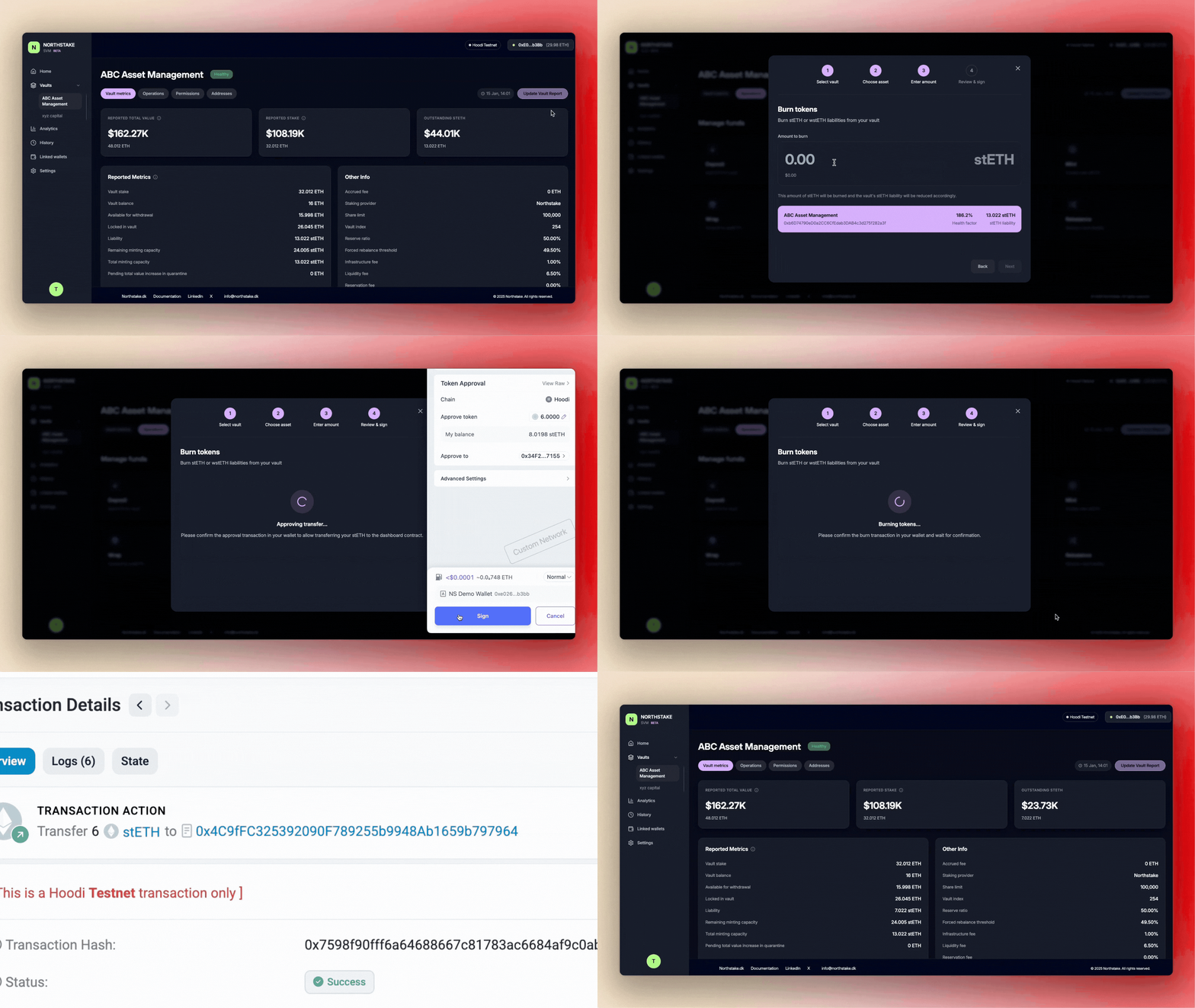
Steps to Burn stETH or wstETH
-
Navigate to the Vault
From the dashboard, open the vault in which you want to reduce token liabilities. -
Open the Burn Operation
- Go to the Operations tab.
- Select the Burn card to initiate the process.
-
Select the Token Type
In the pop-up window:- Choose whether you want to burn stETH or wstETH.
- Click Next.
-
Specify the Amount
- Enter the amount of stETH or wstETH you wish to burn.
- Click Next to continue.
-
Review the Transaction Summary
The summary will display:- Current token liability, and
- Projected liability after the burn is completed.
Review carefully before proceeding.
-
Sign Required Transactions
The burn process requires two transactions:- Transaction 1: Approve the dashboard contract to transfer your stETH/wstETH.
- Transaction 2: Burn the specified amount of tokens.
Sign both transactions in your connected wallet.
Completion
Once both transactions are confirmed, the token liability will be reduced and the updated balance will be reflected in the vault dashboard.
Updated 8 months ago
Did this page help you?